And as a special bonus for me, the theme this week at Tiddly Inks Challenges is Anything Goes (*yay*)! So free rein on creativity.
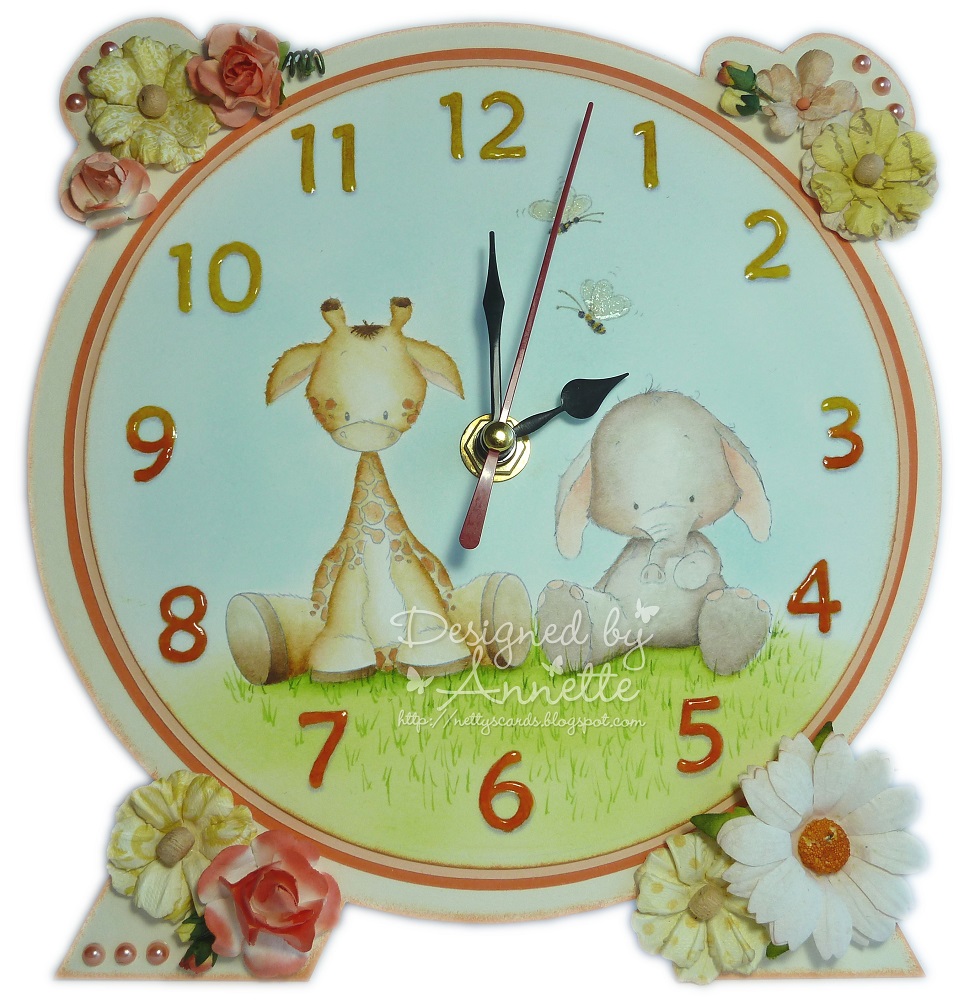
The open theme gave me a chance to make a clock which I've been wanting to try every since seeing some amazing ones on Clarissa & Andrea's blog. The trouble was that I couldn't find a template or tutorial, so I've had to start from scratch.
I was really pleased with how the finished clock turned out and seriously considered keeping it. But I thought that it might be better off with someone a little younger, (although I'm not sure I'll ever grow out of pink and girlie stuff).
Well it's now found a new home with Amelie, who's the daughter of a friend at work. Her dad told me that she liked pink and girlie stuff, and she wrote me a really sweet 'thank you' note when he took it home. Plus I got a box of chocs in return which seemed like a fair trade for a chocoholic like me. :0)
So, I'm going to share with you how I did it, so that you can benefit from my 'trial and error' workings just in case you like what I've done, and want try making your own.
Firstly I'll show you my attempt, and then I'll try to explain how I did it.

Firstly I designed the whole layout in Word. This was partly so that I could print it out at various stages and review the size and shapes etc, but also then so that I could print out the final version to use as a cutting template.
I started with 3 circles of increasing size, each inside the other. This would create the main clock face, a layer to surround the face, and then the actual outer clock frame.
I added the 4 main clock face numbers, 3, 6, 9 and 12, in fancy fonts, and marked the centre of the circles. This is where I would eventually make the hole for inserting the clock mechanism at the end of the project.

I then added a shape to create the base, I think this is called a trapezium, kind of like a squashed rectangle. I then added a smaller one inside it.

I edited out the bottom line that joined the two 'legs' of the base together and placed the 'legs' underneath my circles ensuring the properties of the drawing objects were set to be 'behind' the circles, so that the top of the legs were not showing through.

I then wanted something to make the knobbly bits on the top of the clock. I started looking out for a doggie bone shape as I thought it looked like the ends of a bone, but after some searching I ended up with the top of a tag shape. I edited out the top of the tags, and angled the tag tops and put them 'behind' the circles. I measured them to ensure they were level on either side of the clock.

Finally I added my chosen images, and printed it all out on white card about 16cm in size so that it fitted onto a standard piece of A4 card.
I then carefully cut out the innermost circle with my craft knife and coloured in my image to create the main clock face. I stamped around the edge with mini flowers, butterflies and a bird, drew some grass, chalked in some clouds, and added some liquid pearls and glossy accents.
I had to be sure not to decorate the clock face with anything that is too 3D as otherwise the hands of the clock would not move around freely when I assembled the clock.
I used the remaining outer part of my printed design as a template to cut out the fancy clock shape from cream mount board with a sharp craft knife. (The knobbly bits were not easy and they ended up getting simplified when I actually cut them out).
I inked around the edge of my mount board shape with brown copic and stamped a few extra flowers around the edges.
I glued my image panel onto a brown circle layer slightly larger than the clock face, and stuck it down onto the mount board. I then put some stickles around the edge of one of the layers.
I cut a small hole on the middle marker point and inserted the clock mechanism. I then added some flowers, twine, button and pearls to decorate around the edge, ensuring these were all outside the area where the clock hands would turn so they didn't get caught on anything.
So, here's my final project again, all assembled with the clock mechanism and decorations.

Below is the final template design (minus the characters!). You're free to download it if you like it; click on the image for a larger version, then right click and 'save picture as' to save to your own computer.
- Please follow me in your chosen blog reader, then you will see more freebies as they are posted,
- Please leave a comment on this post to let me know you've downloaded it,
- Please don't share my freebies directly with other people, but please send them over to collect it themselves, and
- Please give me credit when you use any of my freebies by linking back to my blog if you post any finished creations on your own blog.

Well, that's it; my first Tiddly Inks Design Team creation. I hope you like my clock, and will join in with the easy peasy challenge this fortnight. I'll see you again for my second (and final) guest designer spot sometime next month.

See my cards available to buy on eBay

Card Recipe:
- Celebrate Joyfully Emma Digital Image from Tiddly Inks
- Kiki the dog Digital Image from Tiddly Inks
- Sweets for my Sweet clear stamp set
- Word Art numbers on clockface using font "Maiandra GD"
- Clouds - Dovecraft Shimmer chalks
- Wild Orchid Craft Flowers
- Hobby House Pearls
- Glossy Accents
- Stickles
- Pink twine
- Pink flower button
- Card-io Majestix Emily's Garden mini stamps
- Mount Board
- Clock mechanism
- Simon Says Stamp - Anything Goes
- The Hobby House - Pearls (pink pearls)
- Sweet Stampin' - Not a Square (ignore my entry if you only allow card entries)
Annette
xx